

Understanding Spektrum Receivers With Betaflight Compatibility
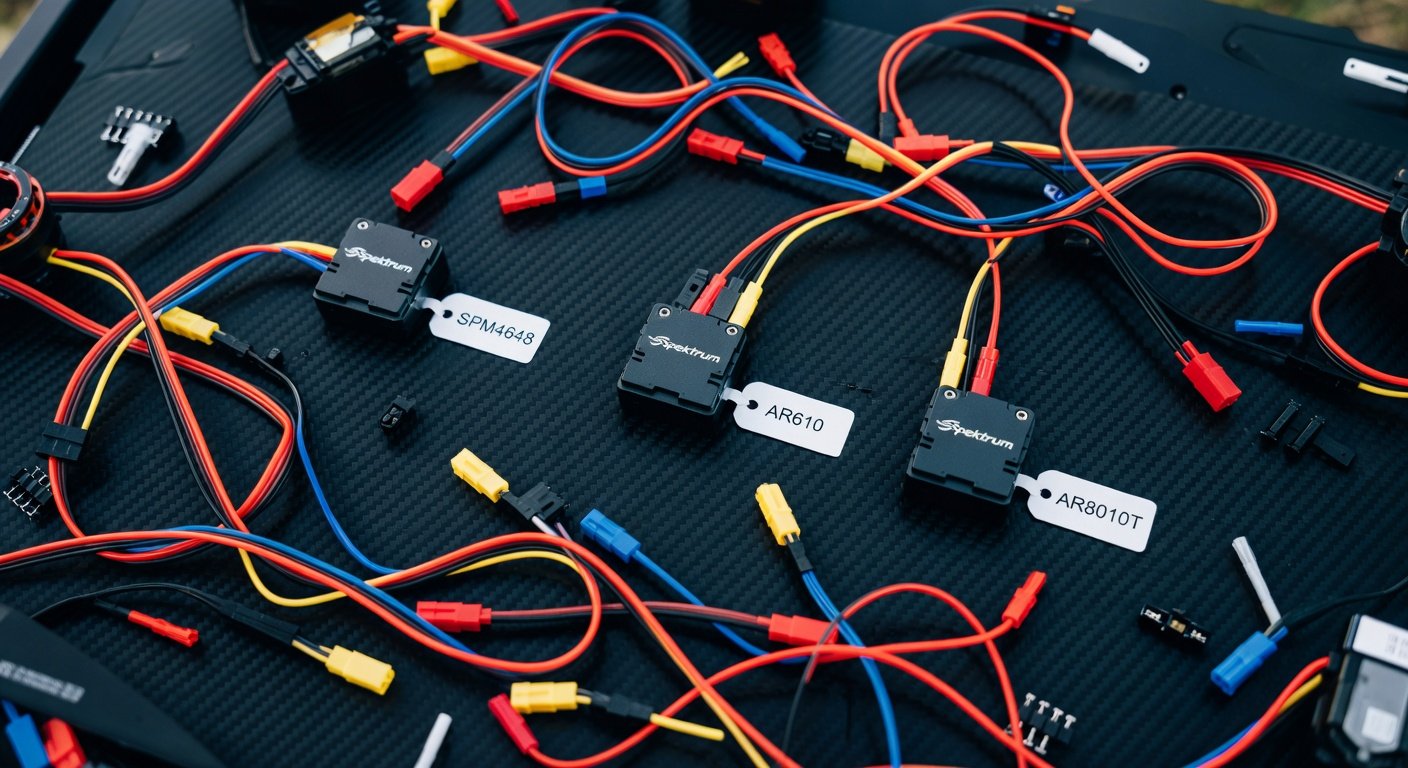
Spektrum receivers have become increasingly popular among FPV pilots due to their reliable DSMX protocol and seamless integration with Betaflight firmware. These receivers offer exceptional range, low latency, and robust signal quality that makes them ideal for both racing and freestyle applications. The compatibility between spektrum receivers with betaflight has evolved significantly over recent years, with Betaflight now supporting most popular Spektrum models including the SPM4648, AR610, AR8010T, and newer satellite receivers. This integration allows pilots to leverage Spektrum’s proven radio technology while benefiting from Betaflight’s advanced flight control features and regular firmware updates.
The primary advantage of using Spektrum receivers lies in their ability to maintain consistent telemetry data and RSSI readings through Betaflight’s configuration interface. Unlike some other receiver protocols that require additional hardware modifications, Spektrum receivers typically connect directly to flight controllers using standard UART connections. This plug-and-play approach simplifies the build process while maintaining professional-grade performance characteristics. Modern Spektrum receivers also support bidirectional communication, enabling real-time flight data transmission back to compatible transmitters, which proves invaluable for monitoring battery voltage, flight modes, and system status during extended flight sessions.
Spektrum Receiver Models Compatible With Betaflight
Several Spektrum receiver models work exceptionally well with Betaflight, each offering unique features suited to different build requirements and flying styles. The SPM4648 stands out as one of the most popular choices for mini quads due to its compact form factor and reliable 6-channel operation. This receiver provides excellent range performance while maintaining a lightweight profile that doesn’t compromise flight characteristics. The AR610 offers similar functionality with slightly different pin configurations, making it suitable for builds where space constraints require specific mounting orientations. Both models support full-range DSMX protocol and provide consistent telemetry feedback through Betaflight’s receiver tab.
For pilots requiring more channels or enhanced telemetry capabilities, the AR8010T represents a premium option that supports up to 8 channels with advanced telemetry features. This receiver excels in applications where complex switch configurations or auxiliary functions are necessary, such as camera control, LED management, or advanced flight mode switching. Satellite receivers like the SPM9745 provide redundancy options for larger builds or situations where primary receiver placement might be compromised by carbon fiber interference. These satellite units connect to primary receivers via short cables, allowing optimal antenna placement while maintaining the main receiver in protected locations within the frame.
Choosing the Right Spektrum Receiver for Your Build
Selecting the appropriate Spektrum receiver depends on several factors including frame size, channel requirements, and specific feature needs. Micro and nano builds typically benefit from compact receivers like the SPM4648, which provides essential functionality without excessive weight penalties. These smaller receivers work particularly well in toothpick builds or ultra-light racing quads where every gram matters for performance optimization. Medium-sized builds ranging from 3-inch to 5-inch frames can accommodate larger receivers that offer additional channels and enhanced telemetry capabilities. The key consideration involves balancing receiver features against weight constraints while ensuring adequate range performance for intended flight applications. Pilots should also consider antenna placement options, as proper antenna orientation significantly impacts range and signal quality regardless of receiver model selection.
Wiring Spektrum Receivers With Betaflight Flight Controllers
Proper wiring between Spektrum receivers and Betaflight-compatible flight controllers requires attention to both power delivery and signal connections. Most Spektrum receivers operate on 3.3V to 5V power supplies, with many flight controllers providing dedicated receiver power outputs that match these requirements. The signal connection typically utilizes a single UART port configured for serial receiver protocol, eliminating the need for individual channel wiring found in PWM configurations. Standard wiring involves connecting the receiver’s signal output to the flight controller’s RX pad, ground connections between both devices, and appropriate power supply from either the flight controller’s 5V output or a dedicated BEC if higher current capacity is required.
Telemetry functionality requires bidirectional communication, which means connecting both RX and TX pads between the receiver and flight controller. This configuration enables real-time data transmission including battery voltage, RSSI values, flight mode status, and other critical flight parameters. Some flight controllers feature dedicated Spektrum/DSM ports that simplify wiring by providing all necessary connections in a single connector. When using these dedicated ports, pilots should verify pin assignments match their specific receiver model, as some variations exist between different Spektrum receiver generations. Proper strain relief and secure connections prevent signal interruptions during aggressive flying maneuvers.
UART Configuration and Port Assignment
Configuring UART ports for Spektrum receivers within Betaflight requires specific protocol selection and baud rate settings to ensure proper communication. The Betaflight Configurator’s Ports tab allows pilots to assign UART ports for serial receiver functionality, typically selecting ‘Serial RX’ from the dropdown menu for the chosen UART. Spektrum receivers generally operate at 115200 baud rate, though some older models may require different settings. The Configuration tab’s Receiver section must be set to ‘Serial-based receiver’ with ‘SPEKTRUM1024’ or ‘SPEKTRUM2048’ protocol selection depending on the specific receiver model and desired resolution. Higher resolution protocols provide smoother control response but may introduce slight latency increases that some racing pilots prefer to avoid.
Binding Process and Initial Setup
The binding process between Spektrum transmitters and receivers follows a standardized procedure that ensures secure communication links while preventing interference from other radio systems. Initial binding requires placing the receiver in bind mode, typically achieved by powering the receiver while holding a designated bind button or connecting a bind plug to specific pins. The transmitter must simultaneously enter bind mode, usually accessed through the system menu or by holding specific button combinations during power-up. Successful binding is indicated by solid LED status on both transmitter and receiver, confirming the establishment of a unique communication protocol that prevents cross-talk with other nearby radio systems.
After successful binding, Betaflight configuration requires channel mapping verification to ensure control inputs correspond to expected flight controller responses. The Receiver tab within Betaflight Configurator displays real-time channel values, allowing pilots to verify proper stick movement translation and switch operation. Default channel mapping typically follows TAER configuration (Throttle, Aileron, Elevator, Rudder), though some pilots prefer AETR mapping depending on transmitter preferences. Range testing should be performed after initial setup to verify adequate signal strength at intended flight distances. This process involves gradually increasing distance between transmitter and receiver while monitoring RSSI values and control response quality.

Failsafe Configuration for Safety
Proper failsafe configuration represents a critical safety feature when using spektrum receivers with betaflight, ensuring predictable aircraft behavior during signal loss events. Betaflight supports multiple failsafe modes including ‘Drop’, ‘Land’, and ‘GPS Return to Home’ depending on flight controller capabilities and pilot preferences. The ‘Drop’ mode immediately disarms the aircraft, suitable for flying over safe areas where immediate descent poses minimal risk. ‘Land’ mode attempts controlled descent while maintaining attitude stability, providing better outcomes when flying over obstacles or populated areas. Failsafe trigger timing should be configured conservatively, typically activating within 1-2 seconds of signal loss to prevent uncontrolled flight behavior. Testing failsafe operation in safe environments ensures proper system response before conducting normal flight operations.
RSSI Setup and Telemetry Configuration
RSSI (Received Signal Strength Indicator) configuration provides real-time signal quality monitoring that helps pilots maintain safe operating distances and identify potential interference sources. Spektrum receivers typically output RSSI data through dedicated pins or embedded within the serial data stream, depending on the specific receiver model. Betaflight can interpret this RSSI information and display it through the OSD (On-Screen Display) or transmit it back to the transmitter for audio/visual warnings. Proper RSSI calibration involves recording signal strength values at various distances and configuring appropriate warning thresholds that provide adequate reaction time before complete signal loss occurs.
Telemetry configuration enables bidirectional data flow between the flight controller and transmitter, providing real-time flight information including battery voltage, current consumption, altitude, and GPS coordinates if available. This information appears on compatible Spektrum transmitters’ displays, allowing pilots to monitor critical flight parameters without relying solely on OSD data. Telemetry setup requires enabling the appropriate sensors within Betaflight’s Configuration tab and ensuring proper UART port assignment for bidirectional communication. Some advanced features like voice announcements or programmable alarms can be configured through the transmitter’s telemetry menus, providing audible warnings for low battery, high current draw, or other user-defined conditions.
Frequently Asked Questions
Which Spektrum receivers work best with Betaflight?
The SPM4648 and AR610 are popular choices for most FPV builds due to their compact size and reliable performance. For builds requiring more channels, the AR8010T offers 8-channel capability with advanced telemetry features. All these models integrate seamlessly with Betaflight firmware.
How do I bind a Spektrum receiver to my transmitter?
Put the receiver in bind mode by holding the bind button while powering on, then activate bind mode on your transmitter through the system menu. Both devices should show solid LED indicators when successfully bound. Always range test after binding to verify proper operation.
What UART settings should I use for Spektrum receivers?
Configure the UART port for ‘Serial RX’ at 115200 baud rate. In the Configuration tab, select ‘Serial-based receiver’ with either ‘SPEKTRUM1024’ or ‘SPEKTRUM2048’ protocol depending on your receiver model and desired resolution.
Can I get telemetry data from Spektrum receivers in Betaflight?
Yes, most modern Spektrum receivers support bidirectional telemetry. Connect both RX and TX pads between the receiver and flight controller, then enable telemetry sensors in Betaflight’s Configuration tab to transmit battery voltage, RSSI, and other flight data back to your transmitter.
How should I configure failsafe with Spektrum receivers?
Set failsafe mode to ‘Drop’ for flying over safe areas or ‘Land’ for controlled descent over obstacles. Configure the failsafe trigger within 1-2 seconds of signal loss and always test failsafe operation in a safe environment before normal flying.
Need Help With Your Spektrum Setup?
Configuring spektrum receivers with betaflight can be complex, especially when dealing with advanced telemetry features or troubleshooting connection issues. Our experienced FPV technicians can help you optimize your receiver setup for maximum performance and reliability. Contact us today for personalized assistance with your build configuration and ensure your Spektrum receiver integration meets your specific flying requirements.